CMS vs Static Pages: how to scale without breaking your site
When building in Webflow, sooner or later you face a dilemma: should everything be automated through CMS Collections, or should you create unique pages manually?
As soon as a client starts producing diverse types of content — from short news posts to complex lead-generation landing pages — architectural decisions become critical for both UX and SEO.
Recently, we worked on exactly this type of case: the client needed a standard blog, but at the same time a flexible builder for webinars and white papers. Here’s how to find the balance — without turning your website into chaos.
Two Approaches: “Factory” vs “Atelier”
1. CMS (Collections) = Automation
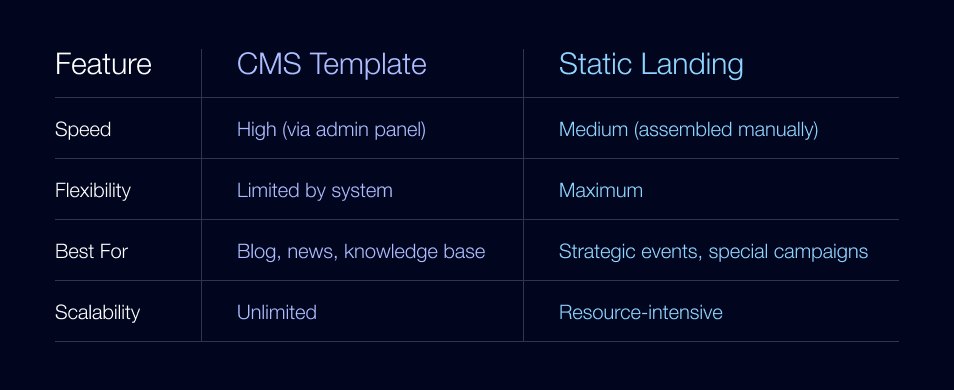
Think of CMS as a factory. You create one template (Collection Page), and it automatically generates pages for any number of entries.
Best for: News, blog articles, glossaries.
Pros: Speed. A marketer can publish a post in five minutes by filling out fields in the admin panel.
Cons: Rigid structure. You can’t change the order of blocks for one specific article without affecting the entire collection.
2. Static Pages = Custom Craft
This is bespoke tailoring. Each page is assembled from blocks (Hero, Speakers, Agenda) as a unique layout.
Best for: Large webinars, lead-gen landing pages, annual reports.
Pros: Maximum flexibility. The design “sells” — every block can be tailored to the specific event.
Cons: Manual work. Every new page must be physically created, which can clutter the page tree and increase maintenance.
The Dilemma: “Mix, But Don’t Shake”
Clients often want their lead-generation page (for example, a webinar registration page) to appear as a regular card inside the “All Resources” grid. This creates a sense of a unified ecosystem, where the webinar doesn’t feel like an external advertisement.
The technical challenge
In Webflow, a CMS card by default links to the template page of that collection. So how do you make one card link to a standard CMS article, while the neighboring card links to a custom static landing page?
The Solution: A Hybrid Approach (The Dummy Item Pattern)
We implemented what we call “smart cards.” Even if a webinar is built as a separate static landing page, we create a corresponding CMS item for it.
How it works technically
- In the CMS, we add a field called Redirect URL.
- In the card design, we set up Conditional Visibility logic:
- If the Redirect URL field is empty → the button links to the standard CMS page.
- If the field is filled → the card redirects users to the custom landing page.
For SEO
To prevent Google from indexing empty CMS template pages, we configure a server-side 301 redirect from the CMS URL to the landing page URL. This transfers link equity and keeps indexing clean.
UX win
Users see one unified grid, click on an event, and seamlessly land on a complex, high-converting page. No visible seams in the experience.
When Does Scaling Become a Problem?
The hybrid approach works perfectly when you have 5–10 webinars. But what happens if the client plans to produce them at scale — 20, 50, or even 100 per year? That’s where the boundary between manual work and automation becomes critical. If you notice more than 15 unique static landing pages, the static approach starts working against the business:
- Update complexity: Changing a button color across 50 static pages requires manual edits.
- Risk factor: It’s easy to forget to update a link or date on one page.
- Platform limits: Webflow has limits on the number of static pages (typically around 100).
Pro Tip: A Complex CMS Template with Toggles
For high volumes, we move the flexibility of the page builder inside the CMS itself using Switch fields.
How it works for the marketing team
When creating a webinar, a marketer simply checks boxes in the admin panel:
- Show “Speakers” block
- Show “Agenda” block (if disabled, it disappears only on this page)
- Dark theme for Hero section
In Webflow, we connect the visibility of each block to these toggles using Conditional Visibility. The result? An automatically generated page that looks and feels like a custom-built landing page — without actually being one.
What Should You Choose?
Final Takeaway
The hybrid “Dummy Item” approach is a smart solution for specific use cases — when you need to integrate a unique landing page into a broader content structure. But if your strategy involves producing content at scale, invest early in building a powerful, configurable CMS template. Because at the end of the day: Good design sells. But good architecture scales.
.jpeg)
.jpeg)